

Cold-temperature correction
Enter your conditions and published altitudes. Calculate FAA or Canadian corrections and inspect the results.
See the calculator →Scan paper pages or import your existing logbook. Review your records on iOS and web, and export polished PDFs or CSVs when you need them.
Start free — scan and save your first 25 entries.
Pilot reviews
5.0 out of 5 · 18 ratings across Canada (12) and US (6)
Swipe to read more reviews
“Pulled the flights out cleanly got the routes and times right. Had to fix just one thing, but it was way faster than typing it all in. Solid app”
“The accuracy is much better than expected! It's not perfect but it is still very accurate. Great app!”
“Been enjoying it so far. Does what it says. UI is clean with additional tools coming regularly. Exactly what I needed.”
“Very handy for when I’m at work, I am very easily able to to take a snapshot of the the ACARS Flight Log and it automatically updates my logbook.”
“Smooth process. Photo log capture works perfectly.”
“been looking for something like this for a while.”
“The best logbook app ever. Easiest transition ever from paper to digital. Hats off to the devs. 👏”
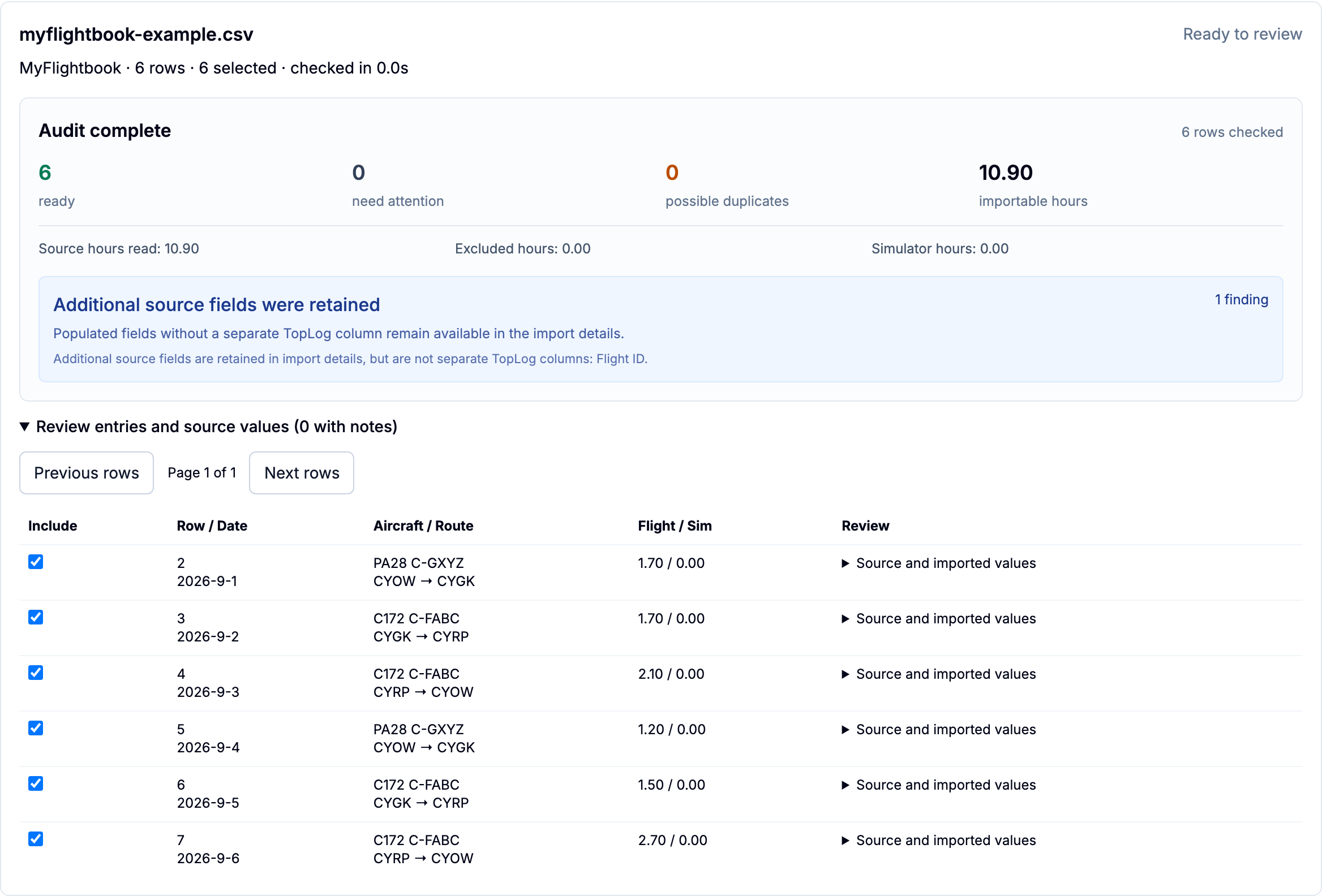
Already logging digitally?
Import from ForeFlight, LogTen, MyFlightbook, or your own spreadsheet on iOS and web. Check the details before saving them to TopLog.
Extraction accuracy
In TopLog's July 22, 2026 benchmark, the evaluated extraction configuration read 3,512 of 3,528 compared hours cells correctly. Across 25 fields, it correctly extracted 7,137 of 7,349 compared cells.
See the methodology, independent review, and every fieldHours cells
99.5%
3,512 of 3,528 correct
All compared cells
97.1%
7,137 of 7,349 across 25 fields
Eval coverage
294
Flight rows across 24 independently reviewed pages
Successful scans
1800+
21,000+ flight rows extracted in production
Privacy
TopLog uploads photos over HTTPS, strips embedded camera metadata during processing, stores files in encrypted cloud infrastructure, and uses them only to extract your logbook entries. We do not sell your data or use your photos to train our own models.
What it captures
TopLog reads the fields pilots already write on paper and turns them into structured digital entries.
Reads the flight date, departure, arrival, and route straight from the page.
Captures aircraft type and registration from your entries.
Pulls total time and other time fields into the entry.
Captures names, roles, and crew notes recorded with the flight.
Keeps your notes and remarks with the entry, so context is never left behind in the photo.
Every photo becomes a digital entry you can edit, complete, and save to your logbook.
Extraction quality depends on photo clarity and handwriting, so every entry comes to you as a draft to review and confirm before it’s saved. You always have the final say.
Export
On plans that include export, create a clean, professionally formatted PDF of your flight history to print, attach to an application, or hand across the table.
CSV
On plans that include export, create structured CSV files for spreadsheets, backups, and carefully reviewed migration workflows.
ForeFlight
On plans that include export, create a TopLog CSV arranged for review against ForeFlight's import template before relying on moved records.
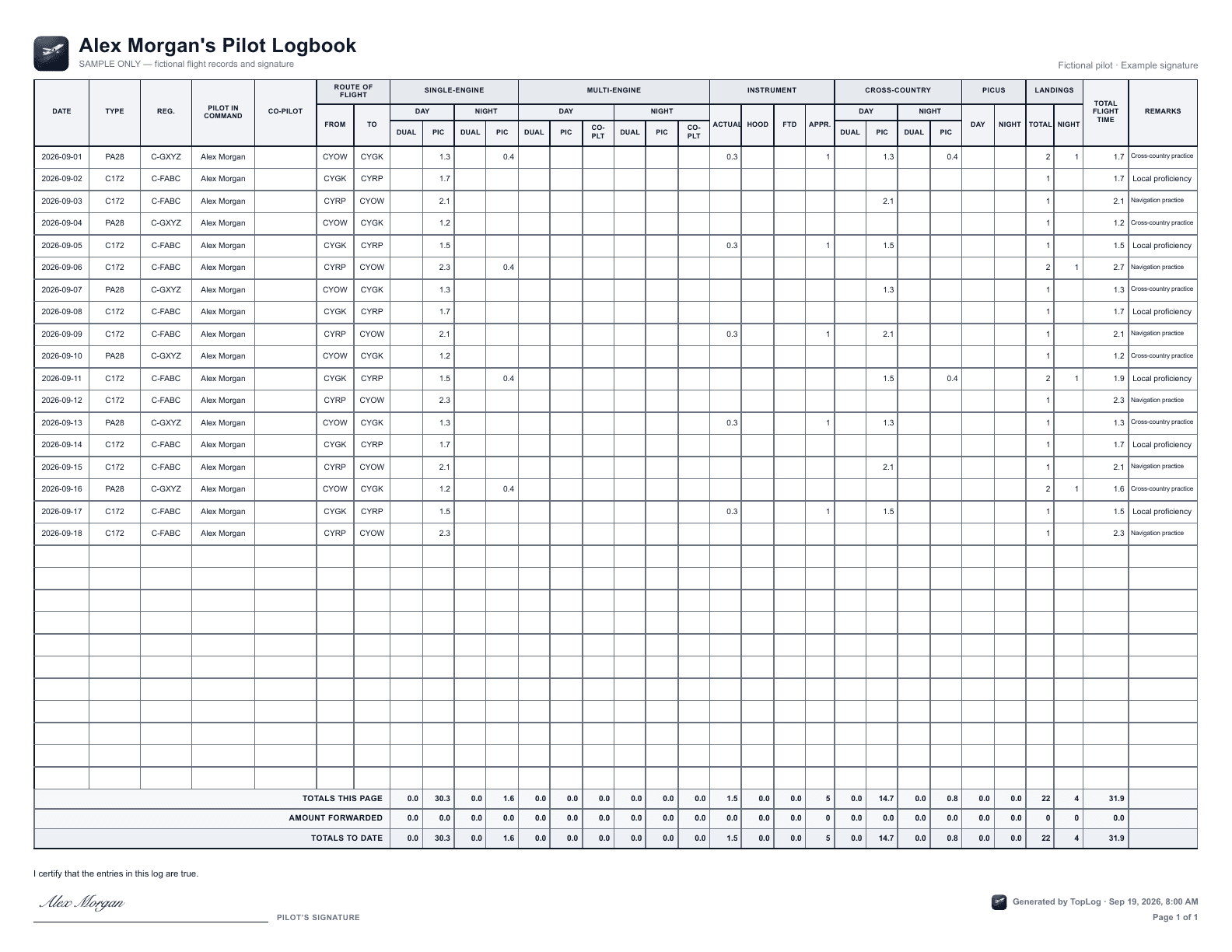
Actual TopLog exports. Fictional records and example signature.
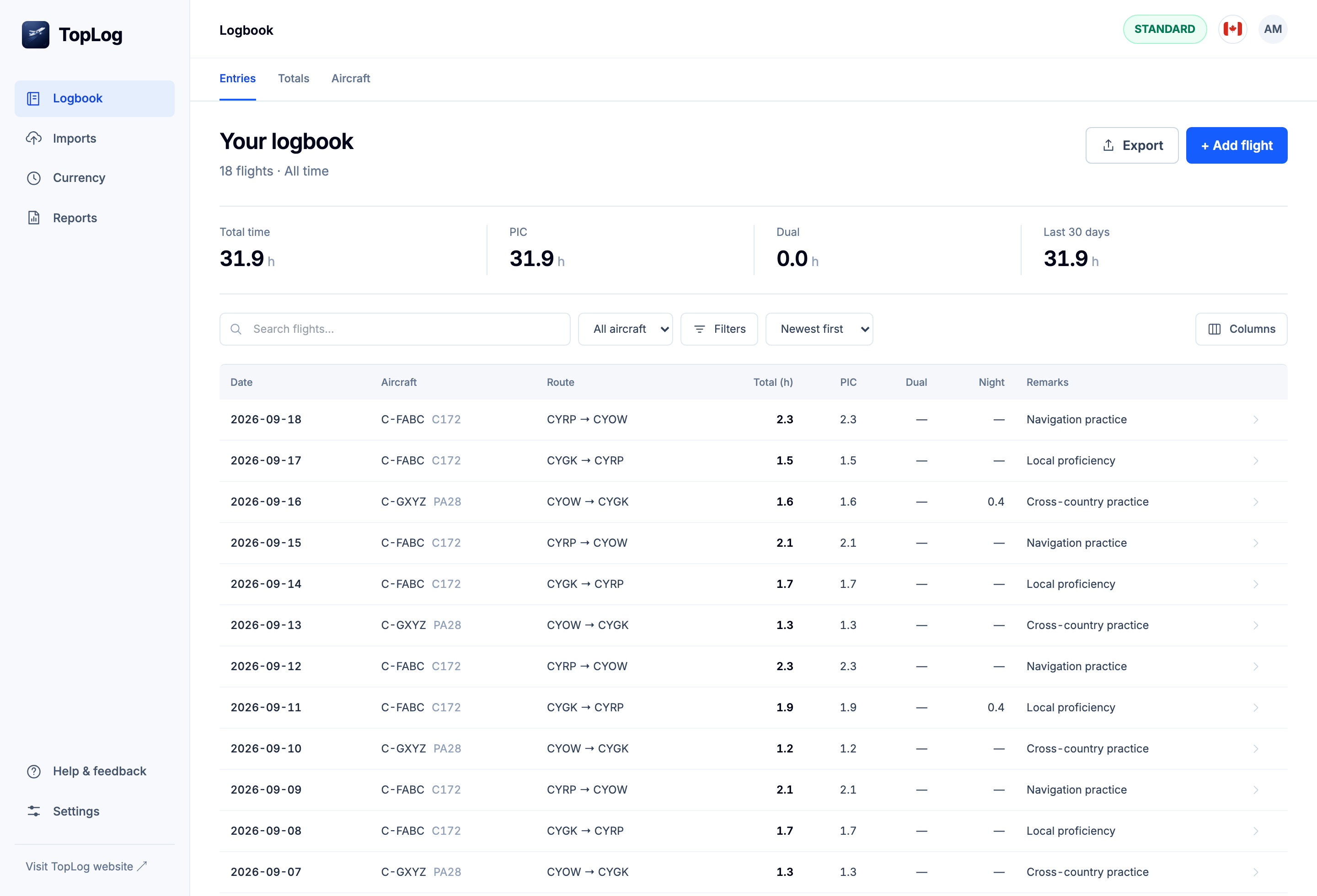
Your working logbook
Scanning your paper history is day one. After that, TopLog is your working logbook: log new flights in seconds, search your full history, watch your totals update automatically, and keep everything synced across iOS and web. The scanner gets you off paper. The logbook keeps you there.
Photograph pages of older flights sitting in a paper logbook instead of typing each line by hand.
Snap the entry, confirm, done. New flights land in your logbook and your totals update automatically.
Find any flight, aircraft, or route in seconds across your entire flying history on iOS and web.
Photos stay with your records as references when handwriting, abbreviations, or route notes need a second look.
In your flight bag · iOS
Enter your conditions and published altitudes. Calculate FAA or Canadian corrections and inspect the results.
See the calculator →Turn block and flight times into the decimal hours you use in your logbook.
Split a rest window into equal breaks, with the schedule available without an internet connection.
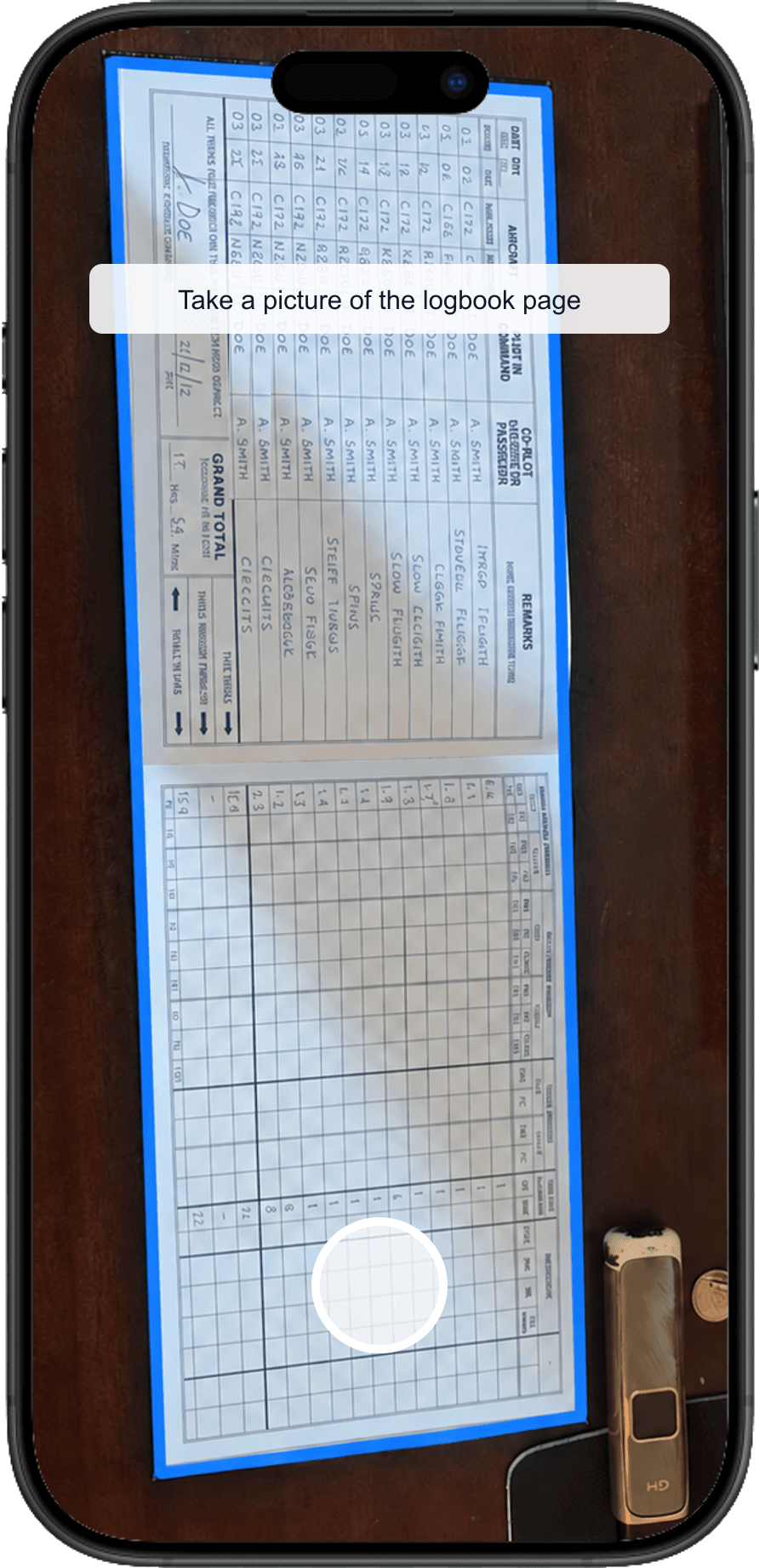
Copying flight details by hand is the worst part of keeping a logbook. Take a photo and TopLog reads the entry for you.
Every transcribed entry shows up for you to confirm before it's saved. Edit what needs fixing, add what is missing, then save the reviewed record.
Your flight history is backed up to the cloud and stays in sync across every device you sign in on. One tap to your hours, no matter where you are.
Honest comparison
Pilot-built belongs in the TopLog story. This table compares product capabilities—including the areas where established products are ahead.
Scroll horizontally to compare all products.
| Criterion | TopLog | LogTen Pro | ForeFlight Logbook |
|---|---|---|---|
| Paper logbook conversion | Built-in photo transcription with pilot review before save. | Spreadsheet or manual import; third-party data-entry service for paper books. | CSV or TSV import; no built-in paper-photo transcription documented. |
| Regulatory formats | United States and Canadian summaries and PDF layouts. | 100+ reports plus regional limit groups for FAA, EASA, Canada, Australia, and others. | FAA-focused reports including 8710 and commercial progress. |
| Endorsements and signatures | Preserves remarks and endorsement text; pilot signature can be placed on PDF pages. No digital CFI workflow. | Stores certificates, endorsements, and signatures. | Digital endorsements, signatures, and remote instructor signing. |
| Currency calculations | US and Canadian passenger, instrument, recurrent / flight-review, and medical tracking. | Configurable currencies and flight or duty limits. | Broad currency tracking integrated with flight records and reports. |
| Offline access | Cached iOS logbook is read-only offline; pilot calculators work offline. Reconnect to edit or import. | Full offline use on Apple devices, with changes synced later. | iOS logbook stored on-device and synced to the web account. |
| Airline roster imports | Not available yet. | Airline schedule imports on Mac, plus supported third-party iOS roster apps. | Flight plans and track logs can create drafts; no airline roster importer documented. |
| Audit tools and edit history | Import history and source-backed review; no immutable, user-visible edit history yet. | Flight audit report and dedicated logbook audit tools. | Review and reporting tools; no user-visible edit history documented. |
| Export completeness | Regional PDF, stored flight-entry CSV, and ForeFlight-template CSV on paid plans. Source photos are separate. | Text exports for flights and supporting people, aircraft, types, and certificates. | Complete PDF; CSV excludes endorsements, signatures, photos, and track logs. |
| Deletion controls | Self-service account closure in iOS; personal-data deletion requests are covered by the privacy policy. | Self-service account deletion request from the app. | Permanent self-service logbook reset on the web. |
| Company track record | Pilot-led independent product, launched in 2025. | Serving pilots since 2003. | Founded in 2007. |
Official product information reviewed August 25, 2026.
ATPL · Airbus A330 · 10+ years in aviation
I started taking digital backups seriously after a paper logbook was stolen. Getting the hours back together was possible, but it meant digging through old records instead of just opening a clean backup.
That is the whole point here: get the entries off paper, review them properly, keep the logbook backed up on iOS and web, and export it when someone asks for your records.
TopLog is actively developed by an airline pilot and software developer. I read every support email and feature request myself and aim to reply promptly. If something would make your logbook easier to use, I'd like to hear about it.
Plain-English guides for choosing a digital pilot logbook, converting paper records, and keeping export options open.
Import from ForeFlight, LogTen, MyFlightbook, or your own spreadsheet. See supported files and the review workflow.
Explore the offline iOS calculator for FAA and Canadian altitude corrections.
See the real iOS and web logbook screens and how pilots review, maintain, and export their records.
Compare TopLog with ForeFlight Logbook, LogTen, MyFlightbook, and other digital pilot logbook options by real use case.
Learn what a digital pilot logbook should do: searchable entries, reviewed fields, backups, exports, and paper-record migration.
Use photo capture and pilot review to convert paper entries into structured digital records without typing every line by hand.
See when a standalone logbook app makes more sense than keeping every record inside an EFB workflow.
Use paid spreadsheet import and export to move reviewed records between ForeFlight and TopLog, checking files against ForeFlight's current template.
TopLog helps turn your paper pilot logbook into a maintained digital one. Use iOS to photograph paper entries, then review, organize, and filter records. Paid plans add PDF, CSV, and ForeFlight-template export.
Take a photo of a page in your paper pilot logbook. The app reads the handwriting and drafts the flight details, including date, aircraft, route, and flight time when visible. You confirm or edit what it found, and the entry is saved.
The standard fields you'd find on a paper logbook page: date, aircraft type, aircraft identifier, route, crew details, and total flight time when those fields are visible. Anything the AI gets wrong is editable before you save.
Yes. Reading handwritten paper logbook entries is the whole point of the app. Clear photos and legible handwriting work best, and you can correct anything that looks off before saving.
No. Treat the AI extraction as a faster draft, not an unchecked official record. You should review every entry and keep whatever original records you need for your own regulatory, training, or employer requirements.
Accuracy depends on photo quality, handwriting, lighting, and page layout. TopLog is designed to reduce manual typing, but the pilot review step is there because logbook details still need human confirmation.
Anyone who keeps a paper logbook. Student pilots clocking training hours, CFIs, private pilots, and commercial pilots tracking time for currency or a career move.
The web logbook includes filtering on every plan. PDF, CSV, and ForeFlight import-template export are available on paid plans for backups, applications, interviews, spreadsheets, or personal review.
Yes. On iOS and web, import your ForeFlight CSV, LogTen tab-delimited TXT, MyFlightbook export, or your own spreadsheet. Check the interpreted rows and any flagged information before saving. Saving spreadsheet imports is included with Standard and Unlimited.
TopLog is free to download and lets you scan and save up to 25 logbook entries. Annual paid plans add more scanning, unlimited manual entries, spreadsheet import, and PDF and CSV export. See the Pricing page for current prices.
Yes. Your flight history is backed up to the cloud and available when you sign in, including from the web logbook.
TopLog is available on iOS and as a web logbook. Android is on the roadmap.